In the last post, we argued that the database should understand application state—not just store rows.
That is a thesis. But a thesis isn’t very interesting if it doesn’t change what a developer actually does.
So let’s make an application. Not a database demo. A real application with projects, tasks, activity, indexes, search, distributed operation, an autonomous agent, local persistence, and a visual development environment.
And let’s start with one command:
npx create-feltdbStart with a question
FeltDB doesn’t begin by asking you to provision infrastructure. It asks you what you’re building.
Here’s what happens when we create an application called monday:
npx create-feltdb
Need to install the following packages:
create-feltdb@0.7.2
Ok to proceed? (y) y
What should we name your FeltDB app? (feltdb-app): monday

Where should FeltDB run?
  ❯ Browser — local-first with durable browser storage
    Node.js — application server or worker
    Self-hosted — dedicated FeltDB server
    Managed — FeltDB-hosted persistence, sync, and workloads

Choose an application framework:
  ❯ React
    Vanilla TypeScript

Enable distributed operation?  ❯ Yes  No
Include an autonomous agent example?  ❯ Yes  No
Install WebLLM for private natural-language app building?  ❯ Yes  No
Choose starter capabilities:  ❯ Search  Vector search  Search + vector search
That’s already different from the traditional database workflow. We’re not choosing a database and then figuring out how to build an application around it. We’re describing the application we want.
For this example, we choose Browser, React, distributed operation, an autonomous agent, WebLLM, and search. FeltDB turns those choices into an application.
Browser is one option—not the architecture
The first question is worth slowing down on: where should FeltDB run?
Browser is the mode we’re using for monday. The database runs with the application in the browser, using IndexedDB for durable local storage. It is useful for applications that should work locally, offline, or with minimal infrastructure. The browser isn’t merely holding a cache of some remote database; it can own durable application state.
Node.js places FeltDB inside an application server or worker. It is the natural choice for APIs, background processes, and workloads where the database belongs alongside server-side application code. The programming model stays familiar. The runtime changes.
Self-hosted runs FeltDB as a dedicated server. Your application talks to FeltDB rather than embedding it, and you control where the authority and durable data live.
Managed moves that operational boundary to FeltDB-hosted persistence, synchronization, and workloads.
Same fundamental state model. Different operational boundaries. Browser, Node.js, self-hosted, and managed are different ways of running FeltDB—not four different databases. For now, we’re starting in the browser.
A few questions later, you have an application
After answering the configuration questions, the generator initializes the development workspace, installs the application dependencies, and starts the development environment.
📦 DEPLOYMENT TARGET
Runtime:       BROWSER
Description:   Browser with IndexedDB (local-first, no server)
Framework:     react
Distributed:   yes
Agents:        yes
WebLLM:        yes — natural-language app builder
Capabilities:  search

✓ Authority
✓ Pairing
✓ Studio
✓ Application
FeltDB development environment ready.
🌐 Application: http://localhost:5173/
🛠️  Studio:     http://localhost:7701/
Open the application and you have a working React application. Open Studio and you have the FeltDB development environment.
There is no separate database server to configure for this browser application. It has durable local state, and it is ready to work with distributed state.
What actually got created?
The generated project is intentionally small.
monday/
├── feltdb/
├── node_modules/
├── public/
├── src/
├── .feltdb/
├── feltdb.config.json
├── feltdb.flow
├── index.html
├── package.json
├── package-lock.json
├── README.md
└── tsconfig.json
There isn’t a giant infrastructure repository hiding underneath it. The application has its source code, FeltDB has its application configuration, and feltdb.flow describes the application’s state model.
feltdb.flow is where you change the database
One of the most important things to understand about a generated FeltDB application is this: you don’t edit the generated database implementation to change your database. You edit feltdb.flow.
The flow is the application’s database and behavior definition. Our generated application starts with three collections:
app monday {
  collection Project {
    name: text
    description: text
    status: text
    createdAt: datetime
    updatedAt: datetime
    index status using hash(status)
  }
  collection Task {
    projectId: text
    title: text
    description: text
    status: text
    priority: text
    assignee: text
    createdAt: datetime
    updatedAt: datetime
    index project using hash(projectId)
    index status using hash(status)
    index priority using hash(priority)
  }
  collection Activity {
    timestamp: datetime
    type: text
    entityType: text
    entityId: text
    entityName: text
    userId: text
    index timestamp using sorted(timestamp)
  }
}
A Project has a name, description, status, and timestamps. A Task belongs to a project and has a title, description, status, priority, and optional assignee. Activity records what happened and when.
The flow defines indexes too: tasks by project, status, and priority; activity ordered by timestamp. The database model is declarative and lives alongside the application.
Want a Customer collection, another Task field, or a new index? Change the flow. Want a capability or workflow? Declare it there. The generated application code consumes that model.
That is a different development experience from maintaining a database layer, ORM models, migrations, and application-specific abstractions independently.
The database model also describes behavior
The flow doesn’t stop at collections. It describes capabilities, workflows, triggers, policies, and agents:
capability Workspace {
  read Project
  write Project
  read Task
  write Task
  read Activity
  write Activity
}

workflow TrackTask(task: Task) {
  step record {
    input task.title
  }
}
trigger on Task.created {
  workflow TrackTask(task)
}

policy Project {
  read: authenticated
  write: authenticated
}
policy Task {
  read: authenticated
  write: authenticated
}

agent WorkspaceAssistant {
  capability Workspace
  workflow TrackTask
}
So feltdb.flow is more than a schema file. It describes the state the application owns, the capabilities available against that state, and some of the behavior surrounding it. The database model is becoming part of the application model.
Now look at the React application
This is where the generated application gets interesting. The React application is not full of database plumbing. Its App.tsx uses normal React state and effects alongside FeltDB state:
const [currentView, setCurrentView] = useState<View>('dashboard');

useEffect(() => {
  getDashboardStats().then(setDashboardStats);
}, [projectsList, tasksList]);

const { data: projectsList } = useCollection(projects);
const { data: tasksList } = useCollection(tasks);
const { data: activityList } = useCollection(activity);
That’s the database integration. The application imports collections and uses a React hook.
There isn’t a database client threaded through every component, a remote API the UI has to know how to call, or synchronization, IndexedDB, and replication logic inside App.tsx. The React application is just an application. FeltDB handles the state underneath it.
The generated FeltDB layer is small too
The generated feltdb.ts connects the application to FeltDB, configures the local development bridge, and exposes its collections:
import { configureDevelopmentRuntimeBridge, createFeltDB } from '@feltdb/core';

configureDevelopmentRuntimeBridge({
  sessionId: import.meta.env.VITE_FELTDB_DEV_SESSION_ID,
  workspaceId: import.meta.env.VITE_FELTDB_WORKSPACE_ID,
  namespace: import.meta.env.VITE_FELTDB_NAMESPACE,
  runtime: import.meta.env.VITE_FELTDB_RUNTIME,
  authorityUrl: import.meta.env.VITE_FELTDB_AUTHORITY_URL,
  bridgeUrl: import.meta.env.VITE_FELTDB_DEV_BRIDGE_URL,
  applicationUrl: import.meta.env.VITE_FELTDB_APPLICATION_URL,
});

export const db = createFeltDB({
  namespace: import.meta.env.VITE_FELTDB_NAMESPACE || 'monday',
  browser: true
});

export const projects = db.collection('Project');
export const tasks = db.collection('Task');
export const activity = db.collection('Activity');
That’s the core connection. The rest is application-specific operations:
await projects.insert(project);

const task = await tasks.findOne({ id });

await tasks.update({ id }, updated);

return tasks.find({ projectId });
Because the React application uses useCollection, the UI reacts to changes in the underlying state. This is what the state-first model looks like in code. The database doesn’t dominate the application. It disappears underneath it.
The application is still just React
The entry point is almost embarrassingly ordinary:
import React from 'react';
import ReactDOM from 'react-dom/client';
import { App } from './App';

const root = ReactDOM.createRoot(
  document.getElementById('root')!
);

root.render(
  <React.StrictMode>
    <App />
  </React.StrictMode>
);
That’s it. No special application framework, no FeltDB-specific runtime replacing React, and no elaborate bootstrapping ceremony. React is still React. The difference is what sits underneath it.
Configuration describes the runtime
The generated feltdb.config.json is equally small:
{
  "namespace": "monday",
  "runtime": "browser",
  "storage": "indexeddb",
  "distributed": true,
  "agents": { "enabled": true },
  "application": { "lifecycle": "managed" },
  "applicationUrl": "http://localhost:5173/",
  "capabilities": { "search": true }
}
Read it from top to bottom: this is monday; run it in the browser; persist in IndexedDB; allow distributed operation; enable agents and search.
Then we can actually use the application
Create a project. Add a task. Change its status. Reload the application. The state remains.
Open the activity view and you can see the events. Open the inspector and you can see the collections and indexes.
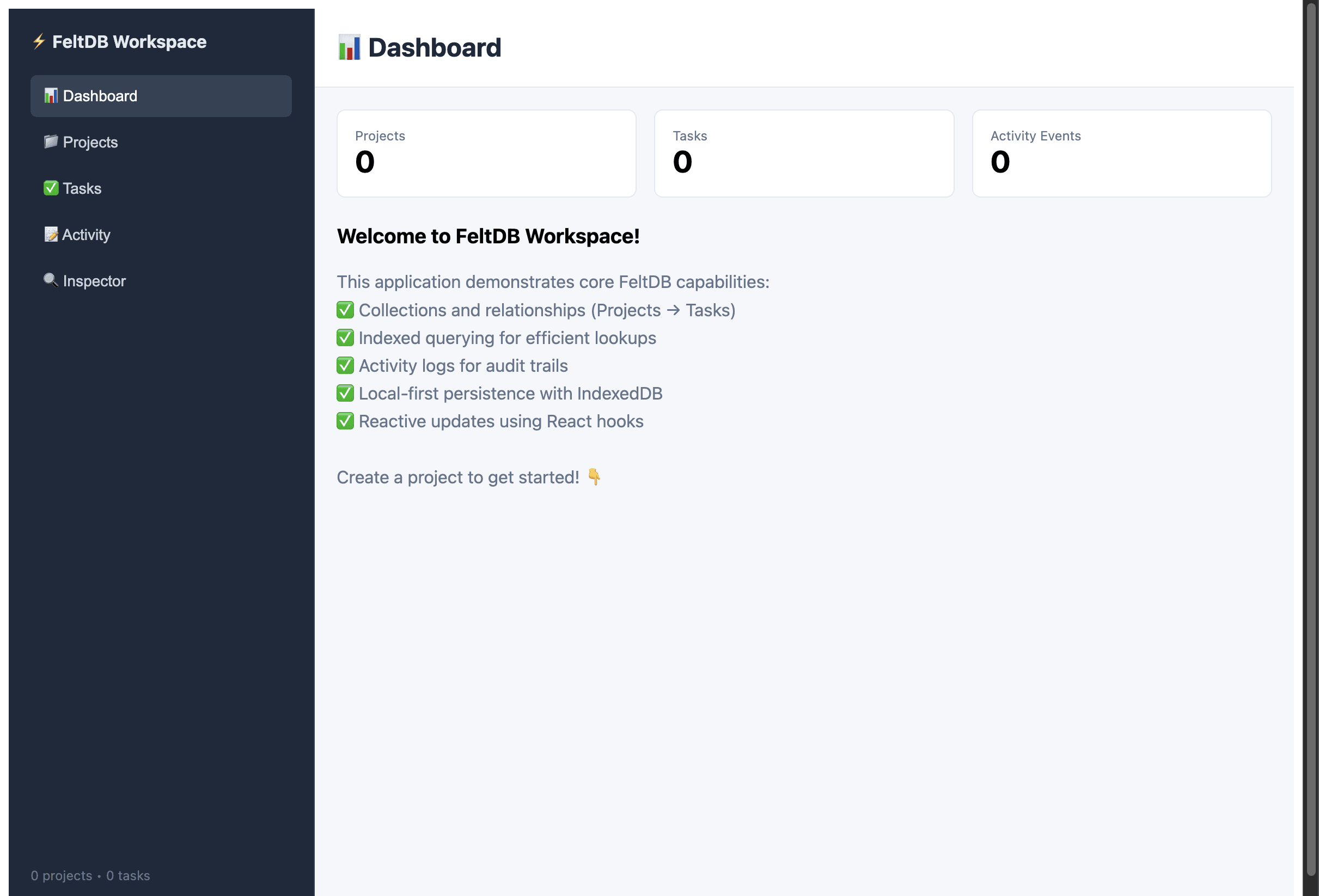
The important thing isn’t that the demo has a dashboard. It’s that the application is operating on durable state without the developer having to build the persistence system themselves. The UI is the surface. The state is the product.
And then there is Studio
The generated application also starts FeltDB Studio: a visual surface over the application and its state.
Instead of treating the database as an opaque service somewhere else, the development environment exposes collections, state, capabilities, workflows, runtime, authority, and workspace.
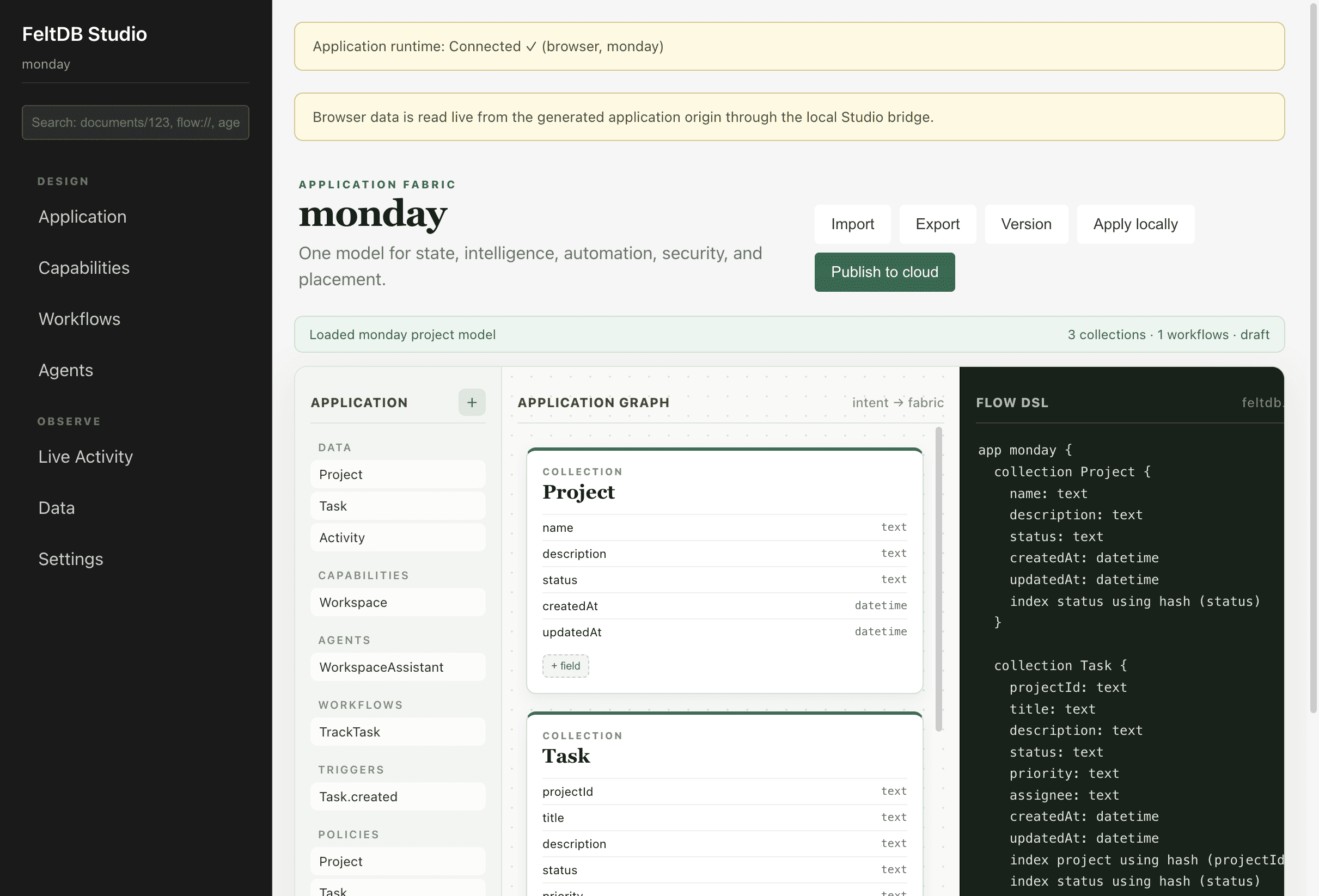
The generated application includes a small development bridge so Studio can inspect its collections. That bridge is intentionally constrained to the local development environment.
The developer isn’t building an admin API just so the database can be inspected. The development environment knows about the application, the application knows about its FeltDB state, and Studio sits around that boundary.
The .feltdb directory
.feltdb/
├── authority/
├── pairing.json
└── workspace.json
The authority directory is where durable authority state belongs as the environment develops. workspace.json identifies the workspace, while pairing.json connects the pieces of the local development environment.
This is not an application-specific infrastructure project you now have to design. It is part of the FeltDB development boundary.
Distributed doesn’t mean complicated
Selecting distributed operation does not mean the first thing we need to do is deploy a cluster. It means the application is built on a state model that can support distributed operation.
A local application can start local, but local shouldn’t mean architecturally trapped. As it grows, authority can move, state can be replicated, nodes can recover, and operations can be deduplicated and ordered.
Those are database responsibilities. They shouldn’t require every application team to invent its own distributed-systems layer.
And we included an agent
agent WorkspaceAssistant {
  capability Workspace
  workflow TrackTask
}
Agents make the state problem obvious. An agent needs memory, tasks, context, durable progress, knowledge of what it already did, and capabilities that bound what it may do. That state must survive an individual model invocation.
The agent isn’t bolted onto the application after the database is finished. It is part of the application model.
WebLLM is another interface to the application
We also selected WebLLM. The goal is to make natural-language application building possible without requiring every request to leave the browser.
The model can become another interface to the application definition: add a customer collection, give tasks a due date, add a workflow when a task is completed, or add search across projects and tasks.
Those requests ultimately become changes to the application model, and that model lives in FeltDB. The AI isn’t replacing the database. It’s interacting with it.
So what did one command actually give us?
We started with npx create-feltdb, answered a handful of questions, and received:
- A React application running locally
- Durable IndexedDB state
- Projects, tasks, activity, and their indexes
- Explicit capabilities, workflows, and collection policies
- A distributed-ready state model
- A capability-scoped WorkspaceAssistant
- Search and a local WebLLM builder
- A development workspace, local authority, and Studio
We didn’t start by provisioning any of it. We described the application, and FeltDB assembled the environment around that description.
One model, four ways to run it
This is why the runtime question comes first. The same FeltDB idea can begin in the browser for local-first applications, in Node.js for servers and workers, self-hosted on dedicated infrastructure, or managed by FeltDB for persistence, synchronization, and workloads.
Those environments deserve their own deep dives. We’ll build the same kind of application in each and look at what changes—and what doesn’t.
The interesting question isn’t simply where the database runs. It is where the application’s state lives, and what the application has to change when that answer changes. With FeltDB, the goal is that the answer can change without forcing the application to be rewritten.
This is what “state-first” means in practice
“State-first” can sound like architecture terminology. It isn’t. It changes the first five minutes of building an application.
A traditional stack often starts with a project, a database, a connection string, an ORM, models, migrations, authentication, caching, and deployment decisions.
FeltDB starts closer to: What application are you building? Where should its state live? What should that state be able to do? What behavior should happen when it changes?
npx create-feltdbAnd you have somewhere to start. Not a database waiting for an application—an application with durable state already inside it.
When you need to change the database, you change the flow. When you need to change the runtime, you change the deployment target. When you need to change the UI, you write normal application code.
The database, runtime, and application are no longer three disconnected systems you have to stitch together. They’re parts of the same application model.
You describe the state. FeltDB gives the application somewhere to live.